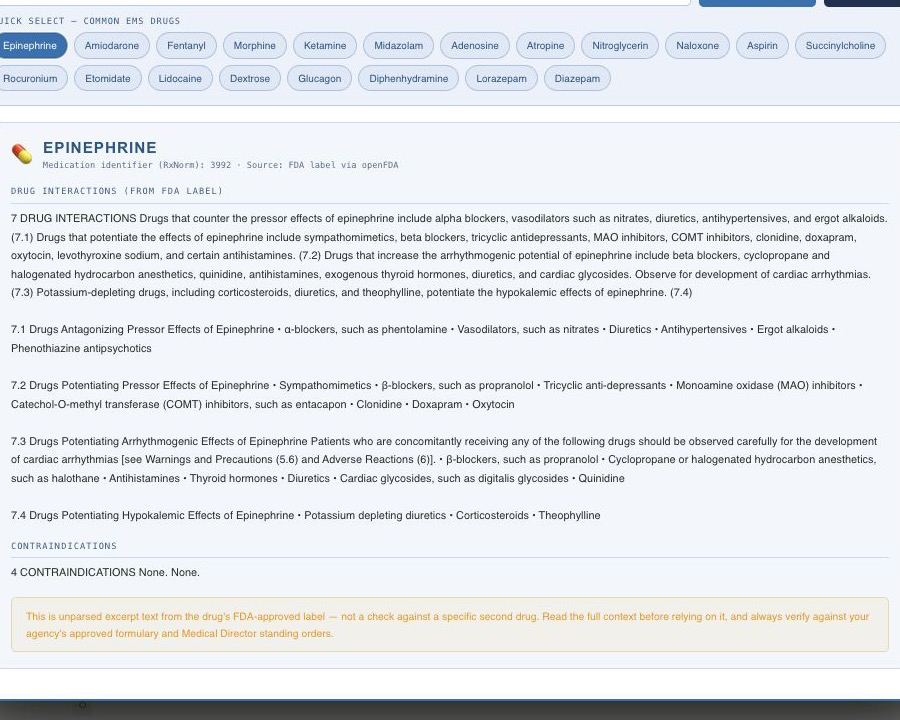
A quick-lookup reference built into the training platform — real government drug-label data, not a static list someone has to keep updated by hand.
A one-medication FDA label reference for study—not a two-drug interaction checker or clinical decision tool.
Current release-candidate UI · synthetic demonstration data
Zoi NTCP FDA Drug Label Lookup — Demo
Follow the one-medication journey from selection and resolved identity to available FDA label excerpts and visible source limitations.
Narration uses an AI-generated voice. English captions are available in the video controls.
How the lookup actually works
1
Search a drug name (brand or generic) or tap one of 20 pre-listed common EMS drugs
2
RxNav (NLM) resolves the name to its RxNorm concept ID (RxCUI)
3
openFDA is queried for available label records associated with that medication
4
Boxed Warning, Drug Interactions, and Contraindications sections are shown verbatim from the label
What a result actually shows
A completed lookup lays out the same three sections in the same order every time — Boxed Warning first, then Drug Interactions, then Contraindications — so a student learns to scan a label the same way regardless of which drug they searched. Each section either shows the label's real text for that drug or an explicit line confirming the label has nothing under that heading; there's no blank space left for a student to wonder whether the lookup actually ran or the drug simply has nothing to show. That consistency is deliberate — it's the same layout whether the search came from typing a name or tapping a quick-select pill, so switching between the two never feels like a different tool.
Where the data actually comes from
Both steps in that pipeline hit real, public U.S. government infrastructure — nothing is cached from a third-party summary and nothing is hand-typed into a spreadsheet by our team. RxNav is the National Library of Medicine's API over RxNorm, the standardized drug nomenclature the rest of U.S. health IT (EHRs, pharmacy systems, the VA) already builds on. Typing "epi," "Adrenalin," or "epinephrine" all resolve to the same RxNorm concept ID (RxCUI) — the tool doesn't care which name a crew member happens to remember. That RxCUI is then handed to openFDA, the FDA's own public API over its Structured Product Labeling dataset, which returns the actual manufacturer-submitted label text for that drug: the Boxed Warning section (the FDA's strongest safety designation, when one exists), the Drug Interactions section, and the Contraindications section — quoted verbatim, not paraphrased or re-summarized by us. When a drug's label genuinely has no boxed warning or no listed interactions, the tool says so explicitly rather than showing a blank panel that looks like something failed to load; and if RxNav or openFDA itself is unreachable, that's shown as a distinct outage message instead of being confused with a real "drug not found" result.
Brand name, generic name — it doesn't matter which one you remember
EMS drugs get called by whichever name stuck during training or a preceptor shift, and that's rarely consistent: the same vial gets referred to by its brand name on one unit and its generic name on another, and both are common in run reports and protocols. The RxNav resolution step exists specifically for that gap — it maps free-text input to a single RxNorm concept regardless of which name was typed, so "Narcan" and "naloxone" land on the same lookup, as do "Levophed" and "norepinephrine." A student doesn't need to know which name is "correct" before searching; the tool figures out what drug is meant and pulls the label for it.
These 20 are the drugs an EMS crew reaches for most — arrest and cardiac drugs, airway and sedation agents, pain management, and reversal agents — pre-loaded as one-tap buttons so a student doesn't need to remember exact spelling or stop to type mid-review. Tapping a pill runs the identical RxNav-to-openFDA pipeline described above, instantly. The quick-select list is a shortcut, not a limit: the search box behind it works against the full RxNorm namespace, so any drug name the FDA has a label for — thousands of them, brand or generic — is searchable the same way, whether it comes up in a training module, a practice-exam question, or just general curiosity while studying.
What this is — and isn't
This surfaces available label text for a single drug — it is not a two-drug interaction checker that evaluates a specific combination, and it is not clinical decision support. It doesn't calculate doses, flag a specific pair of medications a patient is on, or recommend a course of action — it's a fast lookup and reference layer over label data that would otherwise take several manual steps (find the drug, find its current label, find the relevant section) to check by hand. Always verify against your agency's approved formulary and Medical Director standing orders before applying anything found here in the field. See our Medical & Clinical Content Disclaimer.
Reading label sections, not a simplified clinical recommendation
Boxed Warning, Drug Interactions, and Contraindications are the FDA's own section headers, and the text under each is quoted straight from the manufacturer's submitted labeling — the same document a hospital pharmacist or a QA reviewer would pull if they needed the primary source. A Boxed Warning is the FDA's strongest safety designation, reserved for risks serious enough to require prominent, explicit callout on the label itself; not every drug has one, and the tool says so plainly when a drug doesn't rather than implying the section was skipped. Getting comfortable reading that layout — where the warnings live, how contraindications are phrased, what counts as a listed interaction versus a general precaution — is itself a transferable skill for anyone who's going to spend a career reading real drug labels instead of a textbook's condensed version of one.
Limitations worth keeping in mind
This is a lookup over the FDA's approved-label dataset, not an EMS-specific clinical database — a label reflects a drug's full approved indication and population, not necessarily prehospital-specific dosing or protocol context, and it updates only as often as the manufacturer's labeling itself changes. A very new drug, an unusual compounded formulation, or an older product with a thin RxNorm entry may return sparse results or no match at all rather than a fabricated answer — the tool would rather show "not found" than guess. None of that changes the core use case: it's built for looking up a specific, common medication's real label sections quickly, not for exhaustively covering every substance an agency's formulary might ever include.
Why live data instead of a static list
A hand-maintained drug reference goes stale the moment the FDA updates a label — a new boxed warning added, an interaction section revised — and nobody remembers to update the spreadsheet. Because this tool queries RxNav and openFDA directly at lookup time, every search reflects whatever is currently on file with the FDA, with no engineering work or content-team maintenance required to keep it current. The tradeoff is the flip side of the same fact: results are exactly as current, and exactly as limited, as the underlying federal data — if a label hasn't been updated to reflect newer clinical literature, the tool won't know that either. That's part of why it's positioned as a reference lookup alongside your protocols, not a replacement for them.
Who uses it, and when
It's available from the header on every training screen in the student portal, to students at every certification level — EMT, AEMT, and Paramedic alike — not gated behind a specific program or module. In practice that means it gets used two ways: pulled up mid-lesson while working through a pharmacology-heavy section of EMT, AEMT, or Paramedic training, or opened cold to check a drug that came up in conversation, a practice exam question, or a recertification refresher module. It's built for that kind of fast, in-the-moment reference check — not for looking up an entire drug formulary in one sitting.
Where it fits in the platform
This lookup sits next to, not instead of, the platform's other pharmacology-adjacent tools. It's separate from Clinical Reference, which is curated protocol content held back until real Medical Director review capacity exists — this tool ships now precisely because it surfaces primary-source federal data rather than curated clinical guidance that needs sign-off first. It's also distinct from the CME log, which is a separate, self-reported record of continuing education activity. Agencies overseeing a full roster can see how training content — including the pharmacology sections this tool supports — rolls up across their crew on Agency Training Management, and agencies evaluating the platform for their own crews can see how it applies to their setting on the fire department, EMS service, hospital-based EMS, or training program pages.
Frequently asked questions
Where does the drug label data come from?
RxNav, from the National Library of Medicine, resolves one drug name to an RxNorm concept ID. The lookup then queries openFDA for available label sections associated with that medication, including boxed warnings, drug interactions, and contraindications when present. It does not calculate an interaction or interpret the label for a patient.
Is this a two-drug interaction checker?
No — it surfaces the unparsed interactions/contraindications/boxed-warning text directly from a single drug's FDA label, not a check against a specific second drug. Always verify against your agency's approved formulary and Medical Director standing orders before acting on it.
What if a drug has no boxed warning or listed interactions?
The tool shows an explicit confirmation that no such sections exist on that drug's label, rather than leaving the screen blank or ambiguous about whether the lookup worked.
What happens if RxNav or openFDA is down?
The tool distinguishes a genuine zero-match result (the drug name isn't recognized) from an actual service outage, showing a distinct message for each rather than a generic error either way.
Is this tool part of a specific certification level, or available to everyone?
It's a shared reference tool available from the header on every training screen, regardless of certification level — a quick-lookup companion to the training content, not gated content itself.
See the full platform your crew would actually use
Request access and we'll follow up to get your department set up.
One medication label, with the boundary stated up front.
The lookup resolves one medication name through RxNav and retrieves available openFDA label sections. It does not compare a drug pair or replace local clinical direction.